Aksimuth
Your AKS fleet, on your desktop, on your terms.
A local-first desktop console for AKS and Kubernetes. It works through the credentials you already have — your Azure CLI session and your kubeconfigs — and sends nothing anywhere else unless you turn it on.
DownloadSee How Credentials Stay Local
Early release, actively developed.
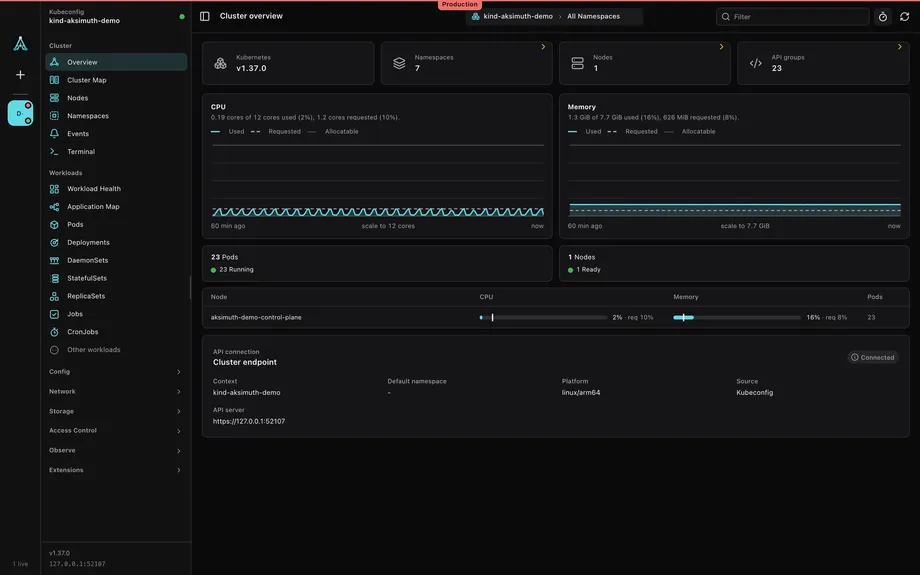
Built to be trusted with cluster access.
For people who read the security section first. Here it is.
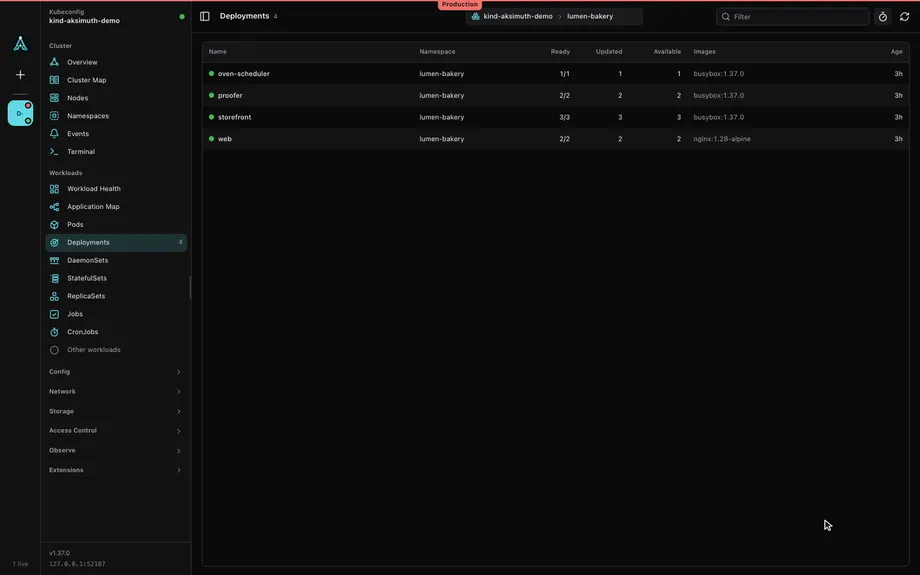
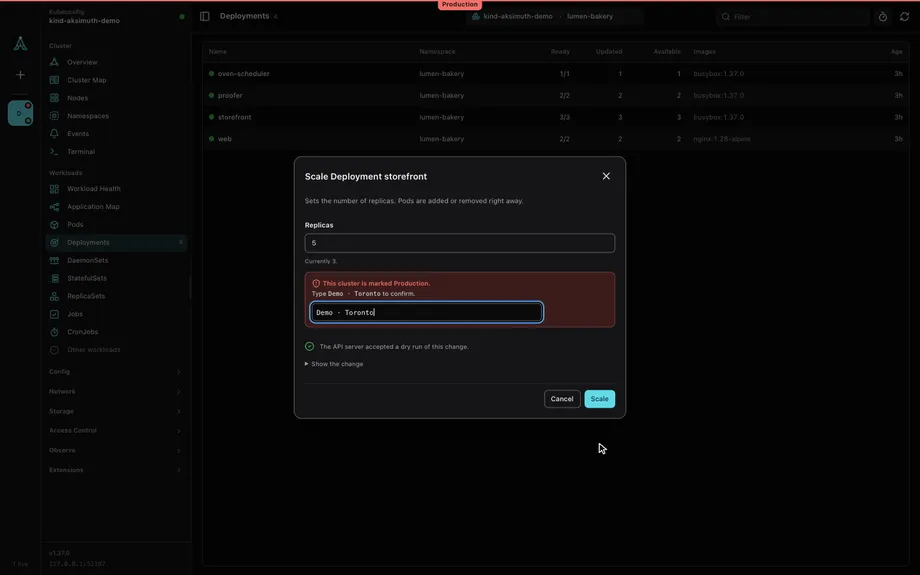
- Open storefront’s menu and choose Scale
- Set five replicas
- The API server accepts a dry run
- Type the Production cluster’s name to enable Scale
Your credentials stay yours
No tracking, no Aksimuth cloud backend, no stored cluster credentials. Credentials stay in your Azure CLI and kubeconfig, where they already live. An assistant key you add is kept in your operating system's credential store, never in a file.
Nothing leaves unless you turn it on
Five network features are separate opt-ins: update checks fetch a signed manifest from this site; anonymous usage counts send the version, OS, processor, channel and edition, with no identifier; Azure list prices for the Cost tab name only VM sizes, regions and a currency; Azure Monitor metrics and Log Analytics query only the workspaces you choose. The assistant sends only when you ask it, and agent access is off until you enable a cluster. See the privacy page.
User credentials only
Aksimuth connects to clusters with your user credentials — never
--admin. The kubeconfig it fetches is held in memory and never written to disk.Secrets are always masked
Secret values are masked in every view, including rendered Helm manifests and dry-run results, and in everything the assistant or an agent receives. A Helm release's values, which can hold credentials, are read from the cluster only when you choose Reveal Values.
Production asks first. Read-only refuses.
Mark a cluster Production and every change to it waits until you type its name. Mark it Read-only and every change is refused until you unlock it, by name, for a set time. Aksimuth itself enforces both, on top of the dry run and your permissions.
Permission pre-checks
Before a mutation is offered, Aksimuth checks what you're actually allowed to do via SelfSubjectAccessReview.
Find every cluster you can reach.
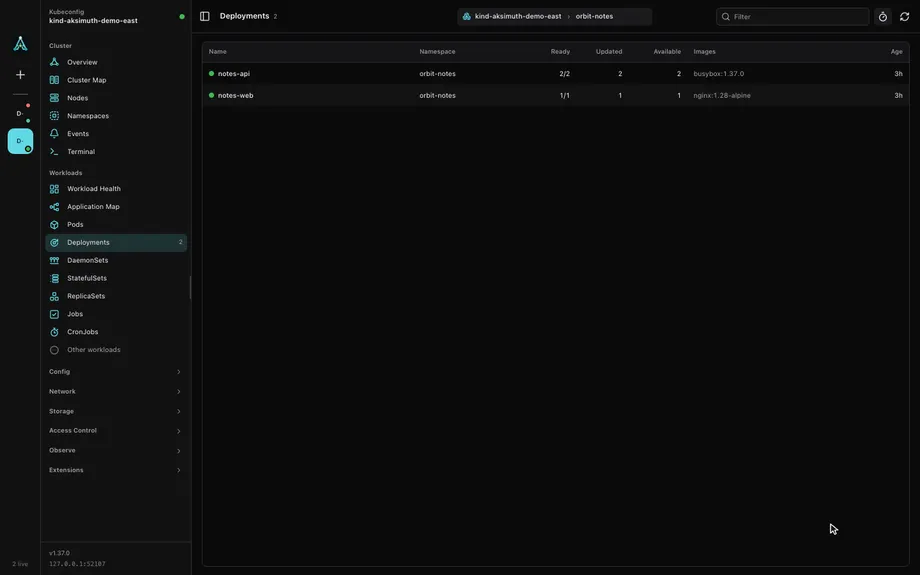
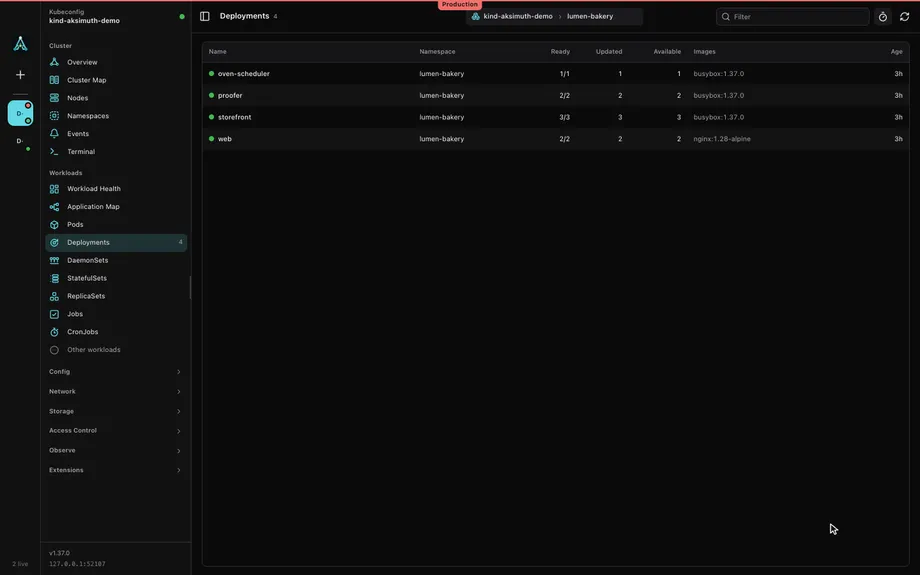
- Two clusters stay connected in the rail
- Point at one to see its name: Demo · Toronto
- Select it: its deployments, as they were left
- Marked Production, under its banner
AKS fleet discovery
One Azure Resource Graph query finds AKS clusters across all your subscriptions, using your own Azure CLI session. If Resource Graph isn't available, it falls back to per-subscription listing.
Kubeconfig discovery
Existing kubeconfigs are discovered too, including
KUBECONFIGmulti-file merges, read from your login shell when Aksimuth opens from the Dock or a launcher — so non-AKS clusters are first-class citizens.Your own kubeconfig files and folders
Add kubeconfig files or whole folders in Settings. They are read, never changed, and take effect without a restart.
Every cluster stays connected
Connected clusters live in the left rail. Switch with one click; each keeps its own navigation, namespace, and running sessions until you disconnect it, and its own colour and tag across the window. Only the clusters you choose connect at launch.
The fleet in one table
List any kind across every connected cluster at once, and diff an object between two clusters without the noise each cluster adds on its own. Secret values are compared, never shown.
Sign in where you work
Each context shows whether it's ready to connect. A kubelogin device code or an exec plugin's MFA prompt is answered in the window, and Azure Government and Azure China clusters are found like any other.
Everything you reach for during an incident.
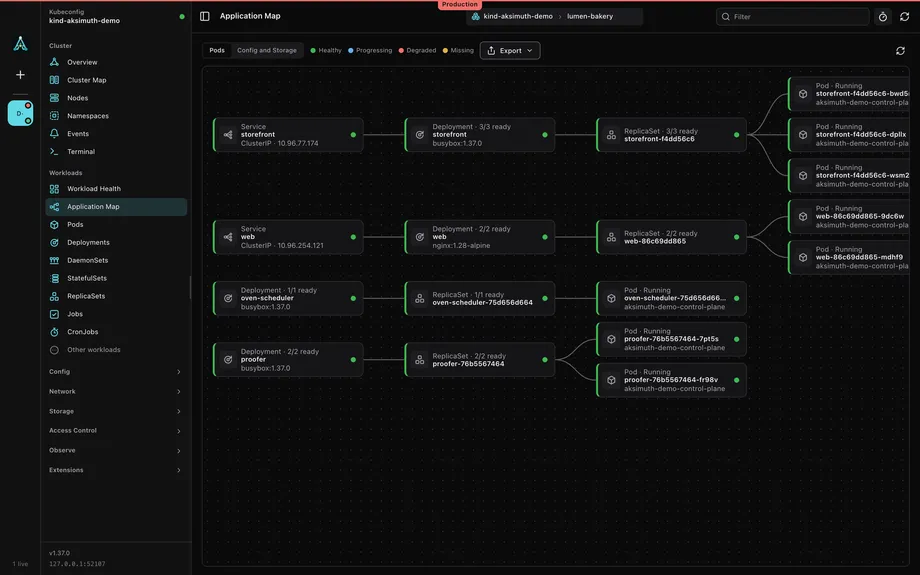
- The application map of a namespace
A command palette for everything
Press Command-K (Control-K on Windows and Linux) to jump to any list, namespace or cluster, or search every kind for an object by name, and keep your hands on the keyboard from there.
A namespace at a glance
Each namespace opens on an overview: workloads by kind with their health, pods that are not ready, counts, quota use, warning events, Helm releases and the busiest pods. Every tile opens the list behind it.
Browse every resource type
API discovery surfaces every listable resource type, grouped sensibly: workloads, config, network, storage, access, and CRDs. Gateway API, devices and admission policies get views of their own.
Details for every common kind
Pods, workloads, Services with their endpoints, Ingress rules, ConfigMap data, Secret key names and certificate expiry (never values), Nodes, storage, autoscalers and jobs each get their own pane. Click a label to narrow the list to it.
Select many, change many
Restart, scale, cordon, label or delete a selection in one go. Every object is permission-checked and dry-run first, and one preview shows what each will do.
Pins, saved views and side by side
Pin the objects you watch, save a filtered list under a name, filter pods by status, and put two clusters side by side in one window.
Tables that keep up
Load More continues past the first 500 rows, pods show their controller and CPU and memory, and any table exports the rows shown as CSV. Logs save to a file whole.
Exec, files and debugging
An interactive exec terminal; a Files tab to browse a container, download, and upload with a preview; and Debug for ephemeral containers, pod copies and node shells with kubectl's profiles. Resize changes a pod's CPU and memory in place.
Port forwards you can keep
Forward to a pod or a service, save the forward, and start it again in one step on your preferred local port when it is free. Turn on Restart on reconnect and it comes back after a pod restart or a lost connection. Web ports open in your browser.
One log viewer
A pod, a workload or a label selector in one view that keeps following through rollouts. JSON and logfmt read as fields; filter by level, text or regex, narrow the time on a volume histogram, follow trace links, and save what you see.
Search logs across the cluster
One query, plain text or regex, over the recent logs of every pod in a namespace or the whole cluster. Results open the pod. Bounded on pods, lines, and time so it stays fast.
Maps of the application and the cluster
Each namespace as a tree from ingresses through services to pods, with health on every card; node pools and the pods on each, with segmentation checks; and live traffic where the cluster’s network or mesh reports it.
Relationships in both directions
Each object shows what it owns, uses and selects, and what uses it: the pods behind a ConfigMap, Secret or claim, the bindings of a Role. A Related tab draws the tree a few steps out, with status on every node.
Metrics and requests
CPU, memory, network and restart history up to 24 hours from an in-cluster Prometheus or, if you turn it on, an Azure Monitor workspace, with a read-only PromQL box. Where Hubble sees L7, request rates, errors, latency and DNS failures per workload. With Log Analytics turned on, logs and events from before the pod was gone.
GPUs and accelerators
Which nodes have GPUs, who holds them, which pods are waiting for one and why, and whether the drivers and device plugins are healthy, with DCGM metrics where they exist.
Hygiene, security and cost
Read-only findings worth fixing in your workloads. Trivy and policy reports where the cluster has them, with Pod Security checks and who-can worked out locally. Requests against usage, priced from Azure list prices if you turn them on, or OpenCost.
GitOps, first class
Flux and Argo CD get their own panels and an overview. Objects they manage carry a Managed by badge and a warning before a manual edit; Reconcile, Sync and Suspend go through the same review as every other change.
Workload Identity, checked
AKS › Identity checks Entra ID, local accounts, the OIDC issuer and every Workload Identity from ServiceAccount to pod, and on request each identity's federated credentials, with what to fix.
AKS upgrades, ahead of time
Version support, upgrade paths, node image retirements and deprecated APIs, for one cluster or the whole fleet. Node Auto-Provisioning and Deployment Safeguards have views of their own.
Helm, end to end
Releases with their status, history, rollback, values and uninstall; chart repositories, including OCI, with search, install and upgrade. Every object a chart renders is dry-run on the API server and your permission for it checked before you confirm. Values are read only when you ask.
Extensions that run no code
Teach Aksimuth about the custom resources you run with one reviewed file: columns, health, related objects, links and shortcuts. Extensions make no requests and cannot change a cluster.
Links to any view
Copy an
aksimuth://link to a view or an object and share it with your team. A link only navigates, and asks before it connects a cluster.Safe mutations, by construction
Every change goes through a server-side dry-run with a diff preview and an explicit one-time confirmation. The YAML editor completes and checks fields from the cluster's own schema and offers a rebase when the object moved on. Deleting a resource requires typing its name.
An extra pair of eyes. Only when you ask.
Aksimuth can ask a model of your choosing to help reason through an incident, about the whole cluster or one resource: Claude Code or GitHub Copilot CLI with their own sign-in, or your own Anthropic, OpenAI-compatible, Azure OpenAI or Ollama endpoint. It is entirely optional and runs only when you ask, from the assistant or with Explain This on a failing object.
The assistant starts from redacted evidence Aksimuth gathers, and when it needs more — the logs of a pod it found referenced, a service's endpoints, recent events — it asks Aksimuth for exactly that. Only a fixed list of read-only lookups is allowed, every request and result appears in the transcript, and you decide whether each batch waits for your approval or runs on its own within a budget. Keys, tokens, emails, IP addresses, and JWTs are redacted before anything is sent, and each turn shows exactly what left. A CLI runs with its own tools disabled, a model gets only those lookups, and neither touches your cluster or credentials directly.
Agents you already run, such as Claude Code, Copilot CLI or Cursor, can reach your clusters through Aksimuth's local MCP server: off until you enable a cluster, and read-only unless you allow changes. A change an agent proposes is dry-run and waits for your approval in the window, Secret changes are refused unless you allow them, and every call is kept in a local ledger you can export.
Platforms and prerequisites.
- Platforms
- macOS as a universal app (Apple silicon and Intel) in a zip. Windows x64 as an installer or a portable zip, and Windows on Arm as a portable zip. Linux x64 as a tar.gz; Linux on Arm is not yet available. Every release ships a
checksums.txt. Aksimuth is a desktop app built with Wails; every helper it runs (Azure CLI, kubelogin, the assistant, the updater) stays behind the scenes with no terminal window. On Linux, run the archive'sinstall.shonce to add it to your application menu. - Azure CLI
- Needed for AKS fleet discovery. Optional if you only connect through existing kubeconfigs.
- kubelogin
- Required for clusters with Microsoft Entra ID authentication enabled.
- Updates
- Off, Notify, or Automatic download, from this site's release channel: a signed manifest once a day, a checksum-verified download, and a restart only when you say so. Nothing is fetched until you choose, and nothing about you or your clusters is sent.
- Status
- Early release, actively developed.
Download.
Free, for Windows, macOS, and Linux.
WindowsYour system
Windows 10 or later
SHA-256
macOSYour system
Universal app for Apple silicon and Intel
SHA-256
LinuxYour system
x64 and Arm64, GTK 3 and WebKitGTK 4.1
SHA-256
Builds are not yet code-signed. Windows SmartScreen asks before the first launch (More info, then Run anyway). macOS blocks the first launch: open System Settings › Privacy & Security, choose Open Anyway beside the Aksimuth notice, and confirm. Verify the checksum below before you approve it.
Verify your download
Compare the SHA-256 of the file you downloaded againstchecksums.txt for this release, or against the checksum shown beside each download above.
macOS
shasum -a 256 <downloaded-file>Linux
sha256sum <downloaded-file>Windows (PowerShell)
Get-FileHash <downloaded-file> -Algorithm SHA256The output must match exactly. If it doesn't, delete the file and download it again.
On the roadmap.
Planned, not shipped — so you know where things are headed.
- Helm chart repositories that need credentials
- Flux image automation and notifications; Argo CD per-resource sync and rollback
- AKS integration insight: Key Vault and Defender
- Microsoft Entra ID sign-in for Azure OpenAI in the assistant